Feature Extraction
The modules in this directory are used to extract acoustic and deep learning features from .wav files. These features are used as input for the classifier pipelines.
Instructions
For installation and environment setup, see the training workflow.
Audio preprocessing
Raw audio recordings are loaded at a sampling rate of 48,000 Hz. A Butterworth bandpass filter is applied to isolate frequencies between 100 Hz and 2,000 Hz, corresponding to the primary frequency range of chimpanzee vocalizations while suppressing out-of-band environmental noise.
Feature extraction for support vector machines
The SVM workflow extracts several feature sets using:
- a Python version of the rasta-mat library,
- the Automatic Analysis Architecture.
For the analyses in this repository, recordings are chunked into 0.5 second frames with 0.25 second overlap. A Butterworth bandpass filter is applied before feature extraction. MFCC and RASTA-PLP low-level descriptors are computed from the filtered signal. For each horizontal band of the MFCC and RASTA-PLP representation, the pipeline derives \(\Delta\) and \(\Delta^2\) features and extracts statistical summaries from the base descriptors and their derivatives.
The feature set is extended with Automatic Analysis Architecture features (Malfante et al., 2018), yielding 1,140 features per audio frame.
Running the SVM extraction script
Use the shell script run_feature_extraction_svm.sh to start extract_features_svm.py from the command line. The main arguments are:
--config_file: optional YAML file with reusable defaults and SVM extraction jobs.--job_name: optional job name underfeature_extraction_svm.jobsin the config file.--input_dir: directory where the.wavfiles are located.--output_dir: output path for the feature.csvfile.--frame_length: frame length in samples.--hop_length: overlap between frames in samples per hop.--filter: Butterworth bandpass filter variables.
The repository config/ directory can define reusable SVM extraction defaults, including frame length, hop length, filter settings, core count, and per-job input and output paths.
sndfile library
If an Ubuntu system reports a missing sndfile dependency, install:
sudo apt-get install libsndfile-devFeature extraction for convolutional neural networks
A multi-channel feature representation is constructed for each audio recording using a four-stage pipeline developed with librosa: mel spectrogram computation, Per-Channel Energy Normalization, per-file z-normalization, and temporal derivative extraction.
Mel spectrogram
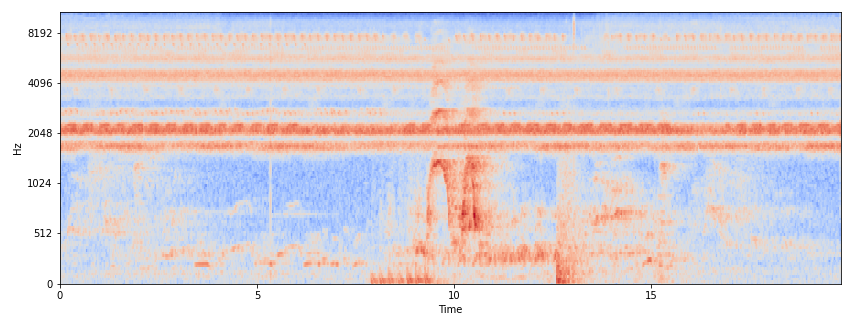
Mel-scaled spectrograms are computed from the filtered audio using a Hamming window with an FFT window length of 750 samples and a hop length of 376 samples, yielding 64 mel-frequency bins. The spectrogram is computed in linear power scale to serve as input for PCEN.
Per-Channel Energy Normalization
Instead of conventional logarithmic compression, the pipeline applies PCEN to the mel spectrogram. PCEN performs adaptive gain control that suppresses stationary background noise while enhancing transient acoustic events such as vocalizations. The PCEN parameters are:
- gain = 0.98
- bias = 2
- power = 0.5
- time constant = 1.5
- epsilon = 1e-6
PCEN is applied to the full-length recording before temporal segmentation so the adaptive gain control has sufficient temporal context for noise floor estimation.
Per-file z-normalization
To reduce environment-specific variation in absolute energy levels, each PCEN-normalized spectrogram is standardized to zero mean and unit variance per frequency bin:
\[ \hat{S}(f, t) = \frac{S(f, t) - \mu_f}{\sigma_f + \epsilon} \]
where \(S(f, t)\) is the spectrogram value at frequency bin \(f\) and time frame \(t\), \(\mu_f\) and \(\sigma_f\) are the mean and standard deviation across time for frequency bin \(f\), and \(\epsilon = 10^{-8}\) prevents division by zero.
Delta features
First- and second-order temporal derivatives are computed from the normalized spectrogram using a Savitzky-Golay-style filter with a width of 9 frames. The original spectrogram and its two derivatives are stacked to form a three-channel input representation of shape \((3, 64, T)\), where \(T\) is the number of time frames in the recording. For short recordings, the implementation pads the edges before computing derivatives and trims the result back to the original length.
Running the CNN extraction script
Run:
sh run_feature_extraction_dl.shThis applies extract_features_dl.py to the dataset. The main arguments are:
--input_dir: directory where the.wavfiles are located.--output_dir: directory where the feature.pklfiles should be stored.--label: the label of the.wavfile, for example chimpanzee or background.--config_file: path to the configuration file containing parameter values such as sample rate, window length, hop length, mel bin count, filter cutoffs, and PCEN parameters.
References
- Malfante, M., Mars, J., and Dalla Mura, M. 2018. Automatic Analysis Architecture. DOI: 10.5281/zenodo.1216028.