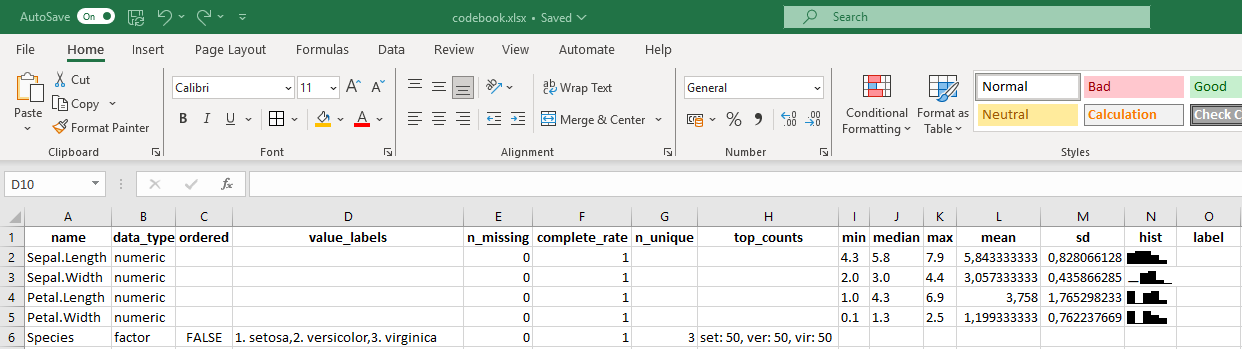
# load libraries

library(codebook)
library(writexl)

# load data

data <- data.frame(iris)

# generate codebook

codebook <- codebook_table(data)

# export codebook

write_xlsx(codebook, "codebook.xlsx")Codebooks
What
A codebook (or data dictionary) is a type of data-level metadata. A good codebook is both human-readable and machine-readable.
Why
The purpose of a codebook is to explain what all the variable names and values in your dataset really mean, making the data understandable and reusable. A codebook is valuable both for researchers within the project and for collaborators and/or re-users outside the project.
Who
The researcher(s) working with the data are responsible for creating and maintaining the codebook.
When
The codebook should be created during the active stage of the project as data is processed. It should be finalized by the archiving and publication stages.
Where
The codebook should be available alongside your data. This would be within your project folder during the active stage and in your data package at the archiving and publication stages.
How
Information to include in a codebook typically includes:
- Variable names
- Readable variable name
- Measurement units
- Allowed values
- Definition of the variable
- Synonyms for the variable name (optional)
- Description of the variable (optional)
- Other relevant resources
For more guidance, see: How to Make a Data Dictionary
codebook R package
The codebook R package can generate both machine-readable (csv, xlsx) and human-readable codebooks (pdf) based on a given dataframe. A very simple example is given below: