Release Notes - Yoda v2.1
Version: 2.1
Released: 3 July 2026
What’s new
Changes affecting functionality for data stewards and researchers
- Data deaccession workflow: new workflow supporting deaccessioning of vault data packages
- Data package archiving: option to move data to the vault instead of copying
- Folder templates: create folder structures from templates in the research space
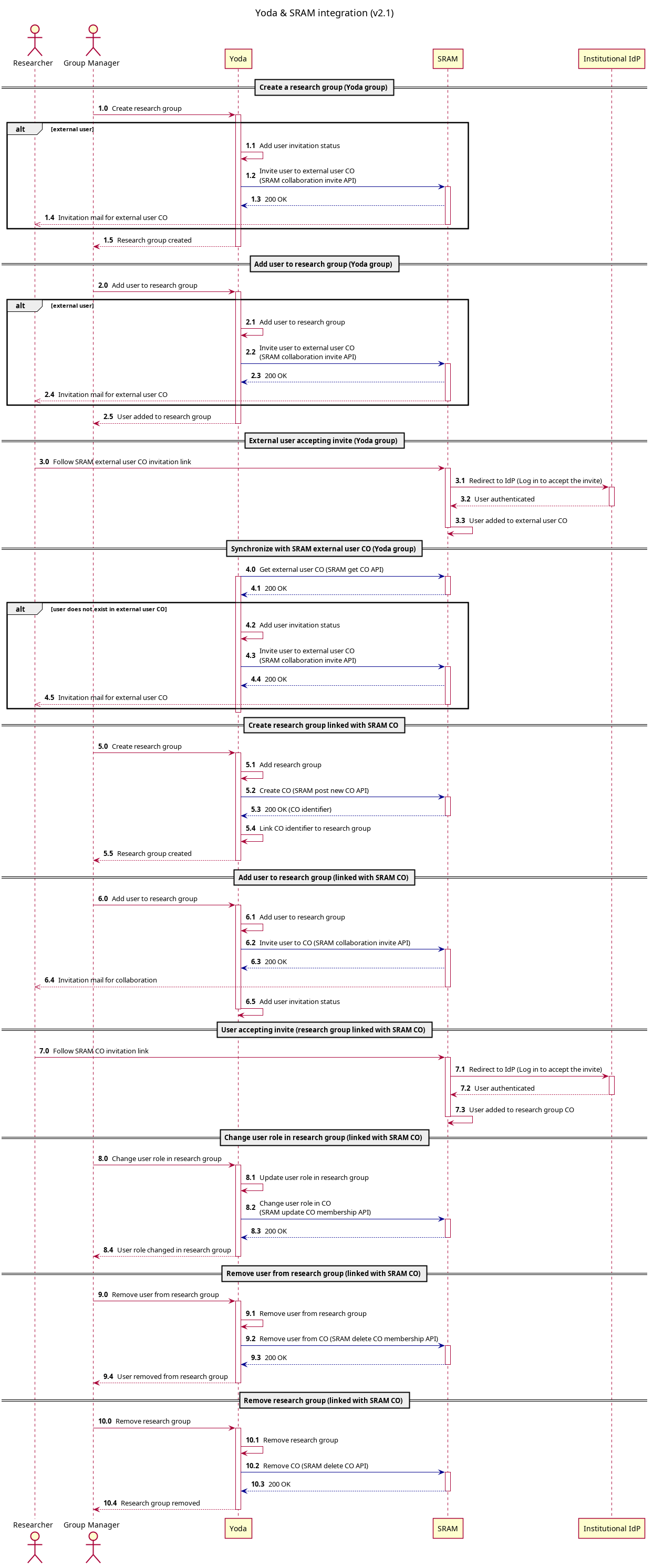
- SRAM integration: improved workflow for external users
- Vault checksums: request checksum reports for all data packages in a vault group
- Checksum report: report is improved with a summary of the collection
- EPOS-MSL metadata: improvements to the EPOS-MSL metadata schema (
epos-msl-1) - Vault module: removed functionality to download data package as a BagIt file
- Notifications: default setting has changed to immediately receive notification emails
- Data transfer: data transfer page now includes configuration for iBridges
Changes affecting technical administrators
- SRAM integration: improved support for external users with separate OIDC configuration
- Copy to research: improved retry logic and configurable multithreading parameter (vault_copy_multithread_enabled)
- Web statistics collection for landing pages: added functionality to optionally collect web statistics for landing pages using Matomo and to show visit count information to landing page visitors. See the Matomo integration documentation for details.
- Async checksums: added functionality to asynchronously generate and verify data object checksums using the delay server
Other changes
- iRODS: upgrade to v5.0.2
- Python-irodsclient: update to v3.3.0
- GoCommands: update to v0.12.3
- Flask and dependencies: update to v3.1.3
- Mailpit: update to v1.30.6
Known issues
- Deadlock in msiDataObjRepl & msiDataObjCopy when called from Python (irods/irods_rule_engine_plugin_python#54)
- The irm iCommand fails for collection names with single quotes (irods/irods#9019)
- Removing a collection via WebDAV fails if the collection name contains a single quote (YDA-7086)
Upgrading from previous release
Software version requirements
The playbook requires Ansible 2.16.x or higher.
Version constraints:
- Requires Yoda external user service to be on version 2.0.x or higher.
- Requires Yoda public server to be on version 2.0.x or higher.
Prerequisites for SRAM enabled instances
Before the first run of SRAM migration script, set the following configuration in the Ansible playbook:
sram_auto_external_users_co_sync: false
sram_auto_group_sync: false
Refer to SRAM Configuration for further information.
Upgrade process
-
Backup/copy custom configurations made to Yoda version 2.0.4 To view what files were changed from the defaults, run
git diff. -
After ensuring the configurations are stored safely in another folder, reset the Yoda folder using
git stashor when you want to delete all changes made:git reset --hard. - Check out the
v2.1.2tag of the Yoda Git repository:git checkout v2.1.2 - Set the Yoda version to
v2.1.2in the configuration:yoda_version: v2.1.2 - If the old configuration contained an iRODS authentication scheme setting, update it to use
pam_password. Example:irods_authentication_scheme: pam_password -
It is recommended to explicitly set the Ansible interpreter path in the
group_vars(if the Yoda environment servers all have the same Linux distribution) or in thehost_vars(if they have different Linux distributions) in order to prevent problems with Ansible using a different interpreter than expected.For EL 9 environments:
ansible_python_interpreter: /usr/bin/python3.9For Ubuntu 24.04 LTS environments:
ansible_python_interpreter: /usr/bin/python3.12 - Install all Ansible collections needed to deploy Yoda:
ansible-galaxy collection install -r requirements.yml - Run the Ansible playbook in check mode:
ansible-playbook -i <path-to-your-environment> playbook.yml --check ### EXAMPLE ### ansible-playbook -i /environments/development/allinone playbook.yml --check - If the playbook has finished successfully in check mode, run the Ansible playbook normally:
ansible-playbook -i <path-to-your-environment> playbook.yml ### EXAMPLE ### ansible-playbook -i /environments/development/allinone playbook.yml - Update publication endpoints if there are published packages (DataCite, landingpages and OAI-PMH):
irule -r irods_rule_engine_plugin-irods_rule_language-instance -F /etc/irods/yoda-ruleset/tools/update-publications.r -
Manually restart Apache on all portal and WebDAV servers, example:
On Ubuntu:
sudo systemctl restart apache2On RHEL:
sudo systemctl restart httpd - Manually restart the portal application on all portal servers
sudo touch /var/www/yoda/yoda.wsgi /var/www/yoda/yoda_debug.wsgi - If there are SRAM groups on the system that need to be migrated to non-SRAM groups, run the migration script. Example:
python3 /etc/irods/yoda-ruleset/tools/sram/sram-migration-script.py -t non-sram -l -f list-of-sram-groups.csv - If SRAM is enabled, re-enable the SRAM syncs. Example:
sram_auto_external_users_co_sync: true
sram_auto_group_sync: true